ChatGPT is the best all-round AI writing tool in 2026 for first drafts, Claude suits long documents, and Gemini suits Gmail and Docs users. Grammarly is the pick for editing, Notion AI for teams, Writesonic for SEO, and Sudowrite for fiction. Paid plans start at $4.99 a month.
Updated November 29, 2026
TL;DR
No single tool wins every job. Use a general assistant to draft, an editor to polish, and a specialist only for SEO pages, brand voice or fiction. Prices below were checked on November 29, 2026.
Key takeaways
ChatGPT, Claude, Gemini, Grammarly and QuillBot publish a permanent free plan, so 5 of the 10 tools can be tested at no cost.
Entry paid plans run from $4.99 a month for Google AI Plus to $79 a month for Writesonic Starter, billed annually.
Grammarly's Free plan allows 100 AI prompts a month and Pro, listed at $12 a month, allows 2,000.
Writesonic bundles AI article writing with AI-search tracking, with plans capped at 15, 25 or 50 articles a month.
Every tool here can state wrong facts. A person has to check names, numbers and claims before anything is published.
What counts as an AI writing tool in 2026?
An AI writing tool is software that drafts, rewrites or checks text with a language model, from a chat assistant to a grammar editor to an SEO article writer.
The label now covers three different jobs. General assistants answer a prompt with a draft. Editors work on text you already wrote. Specialists are built around one kind of output, such as search-optimized articles or novels.
Most buying mistakes come from picking a specialist when a general assistant would do, or the reverse. The table below sorts the ten picks by job.
The three kinds of AI writing tool
Kind
Tools in this list
Main job
General assistant
ChatGPT, Claude, Gemini, Notion AI
Draft, brainstorm and rewrite from a prompt
Editor
Grammarly, QuillBot
Fix, tighten and rephrase text you wrote
Specialist
Writesonic, Jasper, Sudowrite, Copy.ai
SEO articles, brand-voice marketing copy, fiction, sales workflows
Which AI writing tool is best for each job?
Pick by job, not by brand: ChatGPT for general drafts, Grammarly for editing, Writesonic for SEO articles, and Sudowrite for fiction.
The decision table lower on this page maps nine common situations to a first pick. If your situation is not listed, start with a free general assistant and add a specialist only when you hit a limit it cannot solve.
What does our plan check of the 10 tools show?
Half of the ten tools publish a permanent free plan, and entry paid plans span about 16 times in price, from $4.99 to $79 a month.
We recorded each vendor's free-plan status and its lowest listed paid plan that includes AI writing, on November 29, 2026. Five tools (ChatGPT, Claude, Gemini, Grammarly and QuillBot) list a permanent free plan. Three list only a trial (Writesonic, Jasper and Sudowrite), Notion AI lists a limited trial inside Free and Plus, and Copy.ai lists no free plan.
Across the ten entry prices, the middle value is about $14.50 a month. The cheapest is Google AI Plus and the dearest is Writesonic Starter, which also bundles AI-search tracking and site audits.
Lowest listed paid plan per tool, USD per month, November 29, 2026
Tool
Lowest paid plan with AI writing
Billing as listed
Permanent free plan
Gemini
$4.99, Google AI Plus
Monthly
Yes
ChatGPT
$8, Go
Monthly
Yes
QuillBot
$8.33, Premium
Billed annually
Yes
Sudowrite
$10, Hobby & Student
Not stated on page
No, trial
Grammarly
$12, Pro
Not stated on page
Yes
Claude
$17, Pro
Billed annually ($20 monthly)
Yes
Notion AI
$20, Business
Per seat, term not stated
Limited AI trial only
Copy.ai
$24, Chat
Billed annually ($29 monthly)
None listed
Jasper
$59, Pro
Billed yearly ($69 monthly)
No, 7-day trial
Writesonic
$79, Starter
Billed annually
No, 7-day trial
This is our own tally of the vendors' published pages, not a hands-on test. Annual and monthly rates are mixed, as shown in the third column.
Quick comparison
ChatGPT leads on breadth, and each later pick fits a narrower job: long documents, Google apps, editing, Notion teams, SEO, marketing brand voice, paraphrasing, fiction and sales workflows.
Yes means the vendor lists it. Partial means you can get it through general features such as Projects or custom instructions. No means the pricing or product page does not list it.
The 10 best AI writing tools, ranked by overall fit
Rank is a reading order, not a score. Every pick carries a label. Plan details come from each vendor's own site, so confirm them before you buy.
1C
ChatGPT
Editorial
Best for first drafts and general writing help.
General AI assistant
ChatGPT at a glance
Free plan
Yes, with limited messages, uploads and image creation
Pricing, checked Nov 29, 2026
Go is $8 a month and Plus is $20 a month in the US, per OpenAI. Pro is listed from a higher tier; confirm on the vendor site.
Plans listed
Free, Go, Plus, Pro, Business, Enterprise
Writing features listed
Projects, scheduled tasks and custom GPTs on Plus and Pro; memory grows by plan
Team option
Business, billed per user, starts at 2 users
ChatGPT is a general assistant that drafts, rewrites and brainstorms from a chat box. Paid plans add expanded uploads and memory, and Plus and Pro list Projects, scheduled tasks and custom GPTs, so you can keep standing instructions for a recurring writing job.
The trade-off is that it has no built-in brand-voice library or SEO scoring, and a confident draft can still be wrong. ChatGPT fits writers who want one flexible tool for many kinds of text.
What we like
A free plan lets you test it on real work.
Projects and custom GPTs keep standing instructions on Plus and Pro.
Memory and uploads expand on higher plans.
Business and Enterprise plans exist for teams.
Watch out for
Free plan has limited messages, image creation and deep research.
The Go plan may include ads.
No dedicated SEO or brand-voice tooling.
Facts in drafts need a human check.
Quick fact: As of November 29, 2026, ChatGPT has a free plan and paid Go, Plus and Pro plans for individuals, plus Business and Enterprise for teams. OpenAI lists US prices of $8 a month for Go and $20 a month for Plus.
Solo writers and small teams who want one flexible assistant
Not for
Teams that need a managed brand-voice library
2C
Claude
Editorial
Best for long documents and careful rewriting.
General AI assistant
Claude at a glance
Free plan
Yes, with usage limited every 5 hours and every week
Pricing, checked Nov 29, 2026
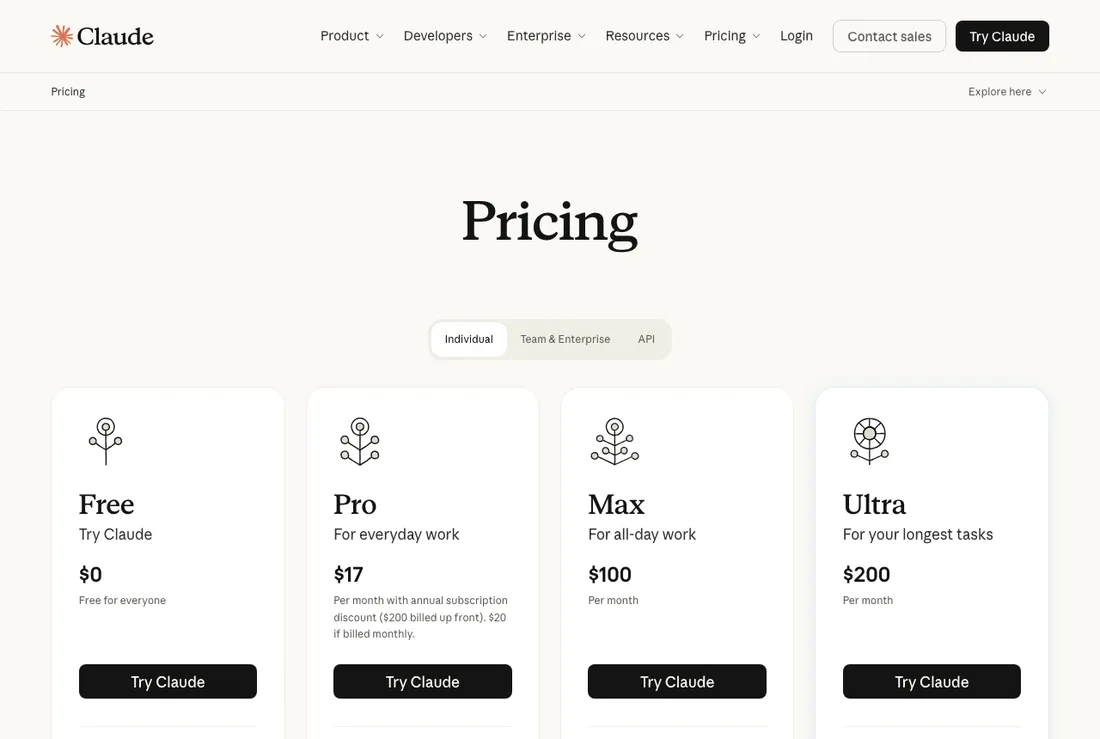
Pro is $17 a month billed annually or $20 billed monthly. Max is $100 a month. Team standard seats are $20 per seat a month billed annually.
Plans listed
Free, Pro, Max, Team (2 to 150 seats), Enterprise
Writing features listed
Projects, Artifacts, memory and preferences on all plans
Context window
Up to 1M tokens, varies by model
Claude pricing page, captured Nov 29, 2026.
Claude is Anthropic's assistant. Its plans list a context window of up to 1M tokens, which varies by model, so it can work from long source documents. Projects hold files and instructions, and Artifacts open a document beside the chat that you can keep revising.
The trade-off is usage: Free is limited every five hours and every week, and Projects on Free are capped at five. Claude fits writers who work from long reference material and revise a document many times.
What we like
Artifacts are available on every plan, including Free.
Projects keep files and instructions together.
A long context window suits big source documents.
Team plans add project sharing.
Watch out for
Free usage limits reset every 5 hours and weekly.
Free allows at most 5 Projects.
No SEO scoring or built-in brand-voice library.
Facts in drafts need a human check.
Quick fact: As of November 29, 2026, Claude has a free plan, Pro at $17 a month billed annually ($20 monthly), Max at $100 a month, and Team and Enterprise plans. Artifacts are available on every plan.
Long reports, edits to big documents and research-heavy drafts
Not for
Writers who want SEO scoring inside the tool
3G
Gemini
Editorial
Best for writing inside Gmail and Google Docs.
General AI assistant
Gemini at a glance
Free plan
Yes, needs a Google Account
Pricing, checked Nov 29, 2026
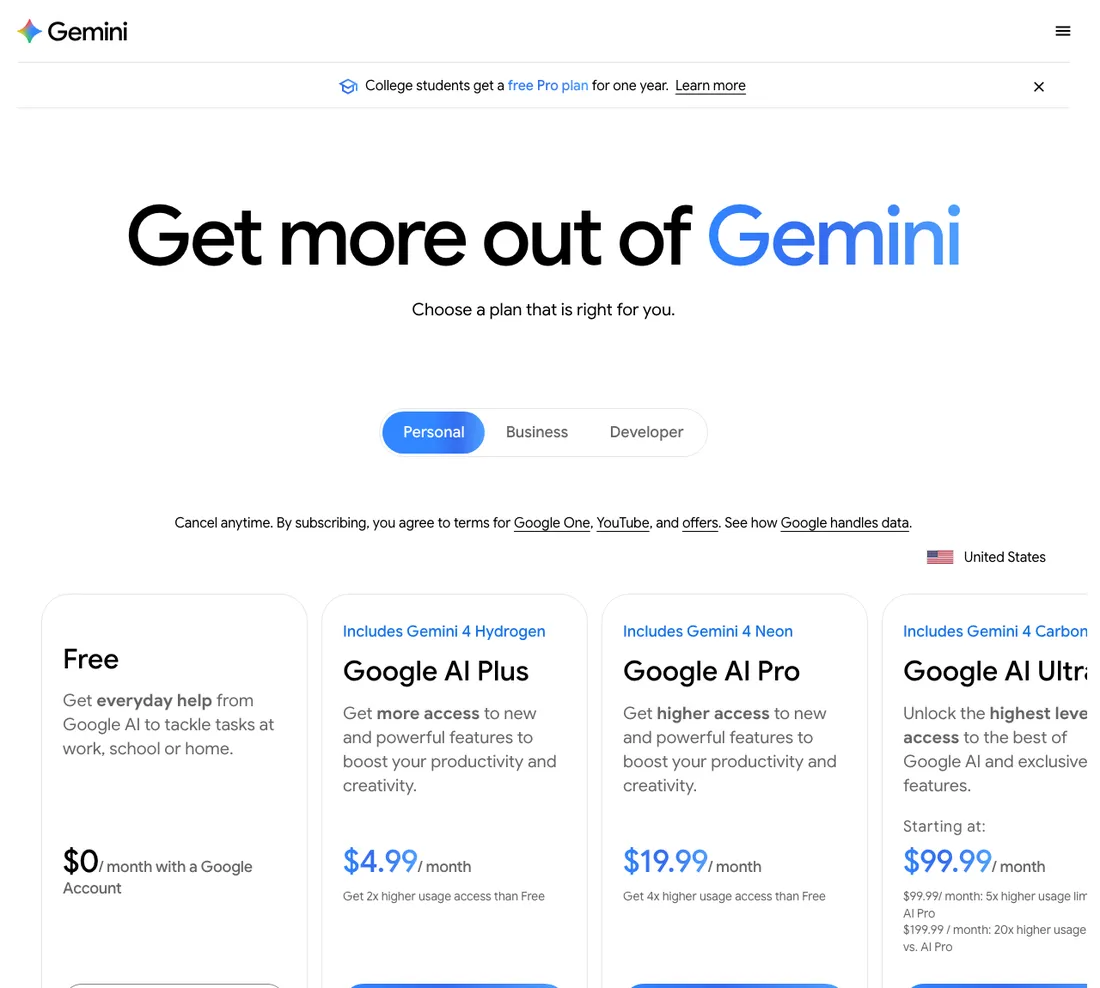
Google AI Plus is $4.99 a month, Google AI Pro is $19.99 a month, and Google AI Ultra starts at $99.99 a month.
Plans listed
Free, Google AI Plus, Google AI Pro, Google AI Ultra
Writing features listed
Deep Research and Canvas from Free; Gemini in Gmail and Docs on Pro and Ultra
Context window
1M tokens on Pro
Gemini pricing page, captured Nov 29, 2026.
Gemini is Google's assistant. Google AI Pro and Ultra list Gemini in Gmail, Docs and more, and Deep Research and Canvas are listed from the Free plan. The Pro plan lists a 1M token context window, and the page mentions uploads of up to 1,500 pages.
The trade-off is that Workspace integration is not listed on Free, and the page does not show a team plan. Gemini fits people who already draft in Gmail and Docs and want help in the same place.
What we like
Free plan includes Deep Research and Canvas.
Works inside Gmail and Docs on Pro and Ultra.
Pro lists a 1M token context window.
Higher tiers raise usage limits.
Watch out for
Workspace integration is not listed on Free.
Plus does not explicitly list Docs.
No team plan shown on the subscriptions page.
No SEO or brand-voice tooling listed.
Quick fact: As of November 29, 2026, Gemini has a free plan, Google AI Plus at $4.99 a month, Google AI Pro at $19.99 a month, and Google AI Ultra from $99.99 a month. Gemini in Gmail and Docs is listed on Pro and Ultra.
Google Workspace users who draft email and documents
Not for
Teams that need shared brand-voice controls
4G
Grammarly
Editorial
Best for editing and polishing what you wrote.
Writing editor
Grammarly at a glance
Free plan
Yes, with 100 AI prompts a month
Pricing, checked Nov 29, 2026
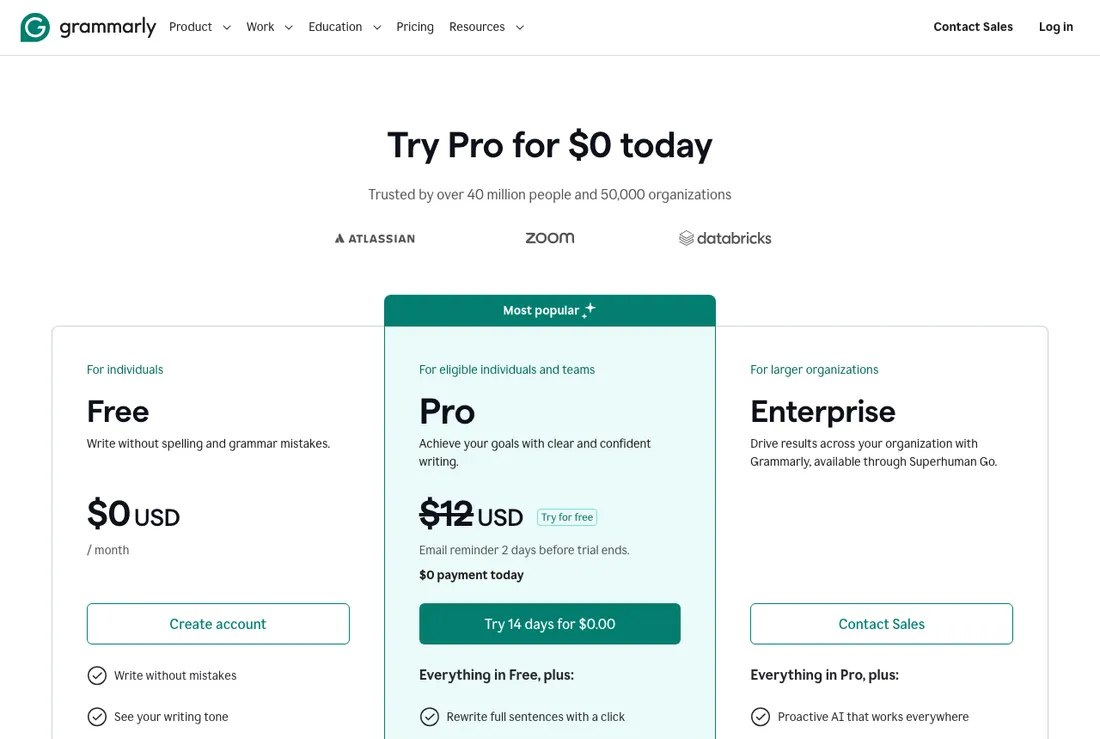
Pro is listed at $12 a month with a free trial. Enterprise is custom. Free includes 100 AI prompts a month.
Plans listed
Free, Pro, Enterprise
Where it works
Windows, Mac, Chrome, Safari, Firefox, Edge, MS Office, Google Docs, iPhone, iPad, Android
Team option
Pro lists 2 user groups, 1 style guide and 1 brand tone
Grammarly pricing page, captured Nov 29, 2026.
Grammarly checks spelling, grammar and tone as you write across apps. Free includes AI text generation with 100 AI prompts a month. Pro lists 2,000 prompts per member per month, full-sentence rewrites, tone adjustment, AI text detection and plagiarism detection.
The trade-off is that it improves text you already have rather than drafting long pieces from nothing, and the page does not say which platforms come with which plan. Grammarly fits anyone who writes in many apps and wants consistent edits.
What we like
Free plan with 100 AI prompts a month.
Pro raises that to 2,000 prompts per member.
Works across browsers, Office, Google Docs and mobile.
Pro adds a style guide and brand tone for teams.
Watch out for
Built for editing more than blank-page drafting.
Platform coverage by plan is not spelled out.
Pro is limited to 2 user groups.
Detection features are indicators, not proof.
Quick fact: As of November 29, 2026, Grammarly has a Free plan with 100 AI prompts a month, Pro at $12 a month with 2,000 prompts per member, and custom Enterprise pricing.
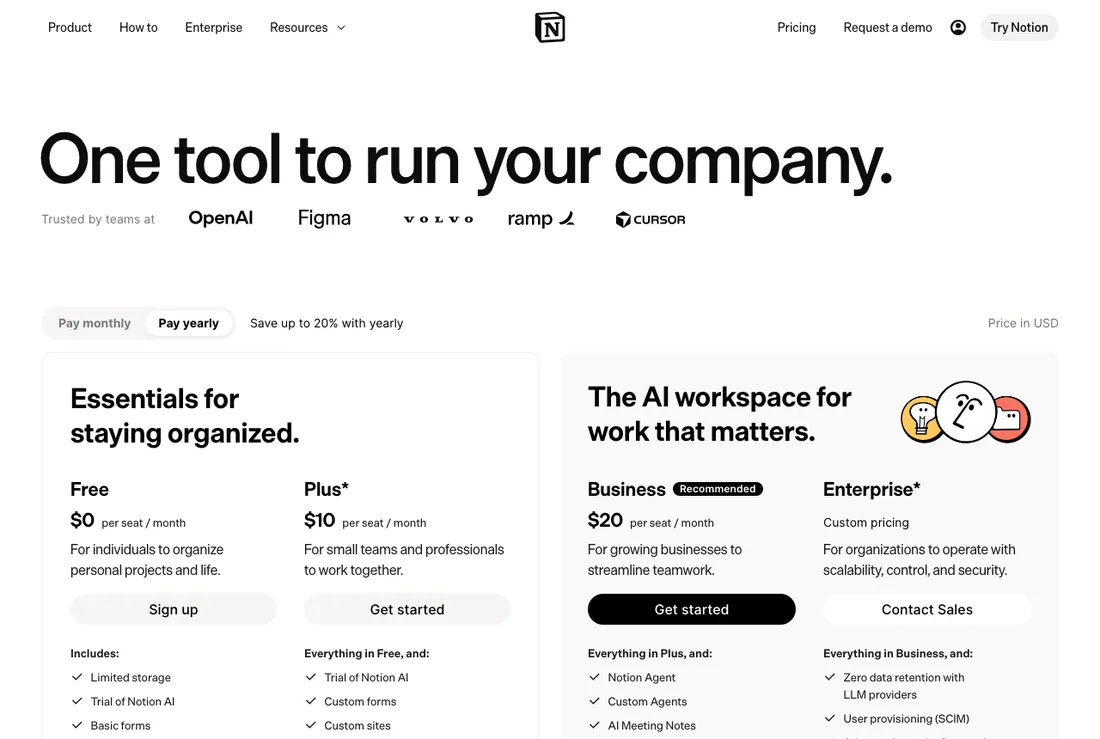
Plus is $10 per seat a month and Business is $20 per seat a month. Free and Plus list only a limited trial of Notion AI.
Plans listed
Free, Plus, Business, Enterprise
AI allowance on Business
1,500 Standard and 500 Select credits per seat per month
Enterprise extras
Custom AI credits, zero data retention with LLM providers
Notion AI pricing page, captured Nov 29, 2026.
Notion AI lives inside Notion pages and databases. Business lists 1,500 Standard credits and 500 Select credits per seat each month, plus Notion Agent, Custom Agents and AI Meeting Notes. Free and Plus list only a limited trial of Notion AI.
The trade-off is that you need to work in Notion, and the credit system can run out. Notion AI fits teams whose docs, notes and tasks already live there.
What we like
Writes where your notes and docs already are.
Business lists agents and AI meeting notes.
You can choose the model with Select credits.
Enterprise lists zero data retention.
Watch out for
Free and Plus include only a limited trial.
Credits are capped per seat each month.
Useful mainly if your team uses Notion.
Plans may not be available for every workspace.
Quick fact: As of November 29, 2026, Notion's Business plan is $20 per seat a month and lists 1,500 Standard and 500 Select AI credits per seat each month. Free and Plus list only a limited trial of Notion AI.
Best for SEO articles and tracking AI search visibility.
SEO and AI-search platform
Writesonic at a glance
Free plan
No; 7-day free trial
Pricing, checked Nov 29, 2026
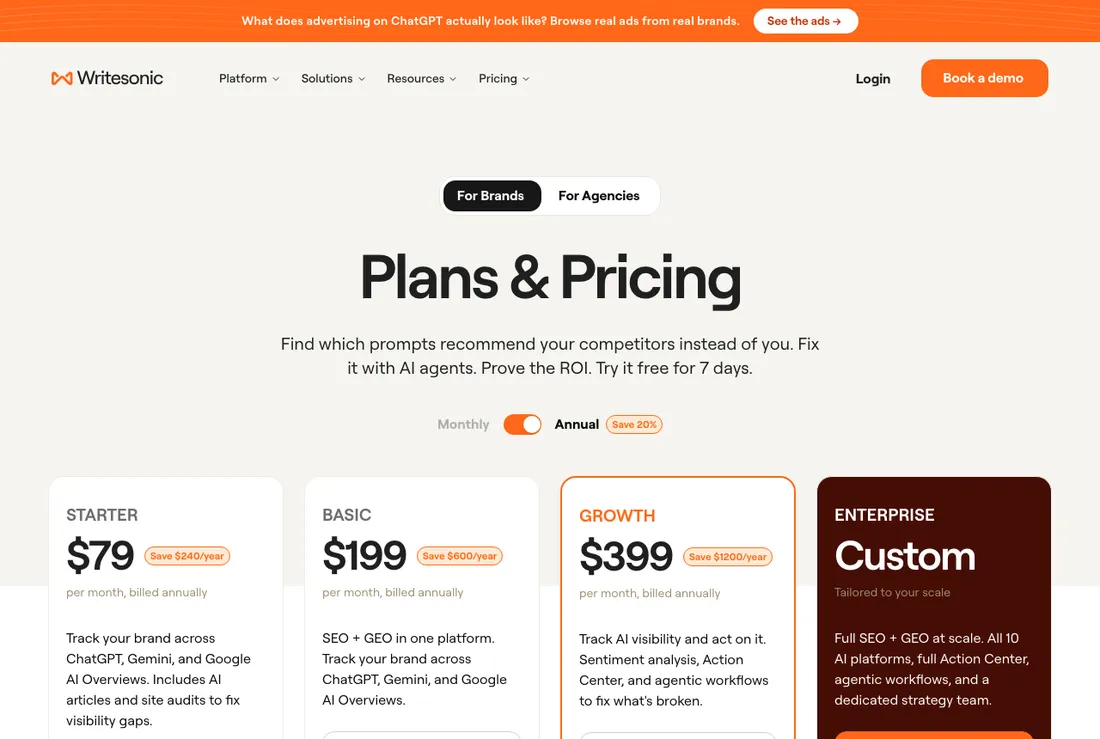
Starter is $79 a month, Basic is $199 and Growth is $399, each billed annually. Enterprise is custom.
Plans listed
Starter, Basic, Growth, Enterprise
AI articles per month
15 on Starter, 25 on Basic, 50 on Growth
Integrations on all plans
Google Search Console and WordPress
Writesonic pricing page, captured Nov 29, 2026.
Writesonic pairs an AI Article Writer with site audits and tracking of how brands appear in AI answers. Plans list 15, 25 or 50 AI articles a month, tracking of ChatGPT, Gemini and Google AI Overviews, and Google Search Console and WordPress integrations on every plan.
The trade-off is that it is a marketing suite rather than a simple writer, with article caps and one to three users on self-serve tiers. Writesonic fits SEO teams that want drafting and AI-search tracking in one place.
What we like
AI Article Writer is on every plan.
Tracks ChatGPT, Gemini and Google AI Overviews on all plans.
Site audits are included.
WordPress and Search Console connect on every plan.
Watch out for
No permanent free plan.
Self-serve tiers cap articles and users.
GA4 and Looker Studio are Enterprise only.
Overkill for casual writing.
Quick fact: As of November 29, 2026, Writesonic has no free plan but a 7-day free trial. Plans are Starter at $79, Basic at $199 and Growth at $399 a month billed annually, with 15, 25 and 50 AI articles a month.
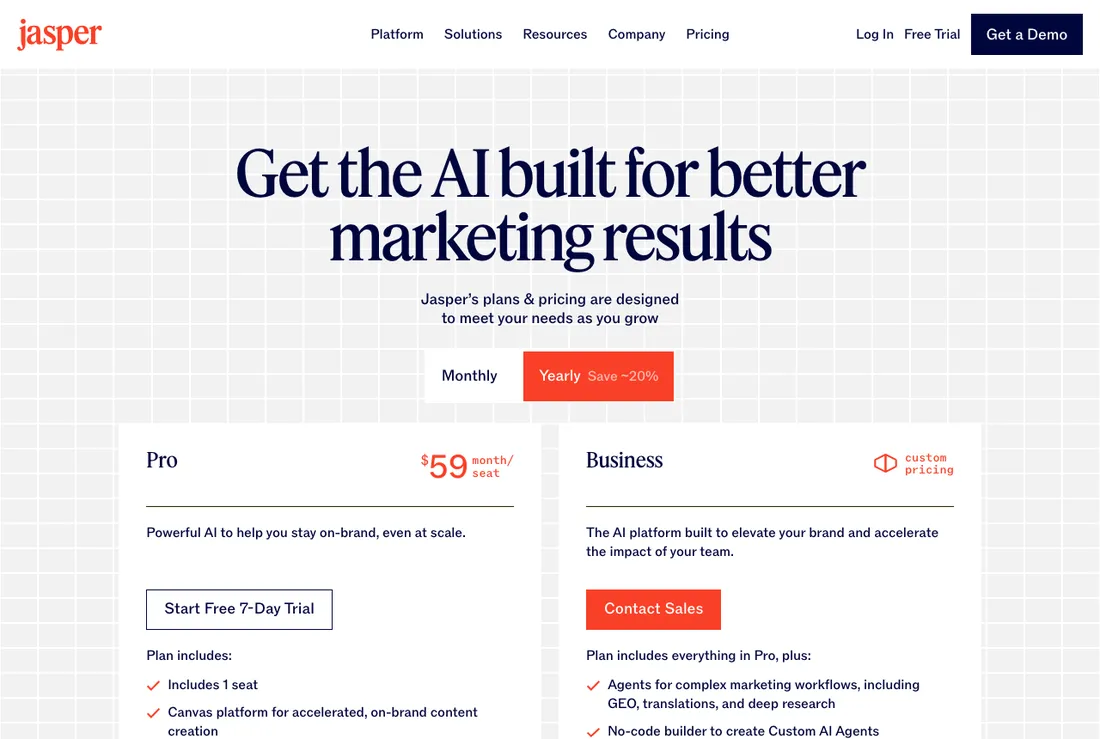
Jasper is built for marketing teams. Pro lists two Brand Voices, five knowledge assets and three audiences, plus agents for core marketing workflows. Business lists unlimited voices, knowledge and audiences, SSO, SCIM and agents for complex work such as GEO and deep research.
The trade-off is that Pro includes one seat, so teams need Business, and some features run on credits. Jasper is a Featured Partner on this list, which is paid placement and does not change its position. It fits marketing teams that want brand consistency across writers.
What we like
Brand Voice, Knowledge and Audiences are built in.
Lists 100+ purpose-built marketing agents.
Integrations include Webflow, Google Docs and Slack.
Business adds SSO and team analytics.
Watch out for
No permanent free plan.
Pro is a single seat.
Agents and GEO Hub reports run on credits.
Paid placement is labeled, so weigh it accordingly.
Quick fact: As of November 29, 2026, Jasper Pro is $69 per seat a month ($59 billed yearly) with a 7-day free trial and one seat. Business pricing is custom. Jasper is a Featured Partner, which is paid placement.
Marketing teams that must keep one voice across many writers
Not for
Solo writers who only need drafts
8Q
QuillBot
Editorial
Best for paraphrasing, summarizing and quick edits.
Paraphraser and editor
QuillBot at a glance
Free plan
Yes, paraphraser up to 125 words, summarizer up to 1,200 words
Pricing, checked Nov 29, 2026
Premium is $8.33 a month billed annually. The Team plan expects 5 or more members.
Premium limits
Unlimited paraphraser, 9 modes, summarizer up to 6,000 words
Plagiarism checker
25,000 words a month on Premium
Where it works
Chrome and Edge extensions, macOS app, Word add-in, Android and iOS
QuillBot rewrites and condenses text. Free allows up to 125 words in the paraphraser with two modes and a summarizer up to 1,200 words. Premium lists an unlimited paraphraser with nine modes, a summarizer up to 6,000 words and a plagiarism checker of 25,000 words a month.
The trade-off is that it works on text you supply and does not draft long pieces. The page also does not say which extensions are free. QuillBot fits students and editors who rephrase and condense existing text.
What we like
Free plan with a paraphraser and summarizer.
Premium lists nine paraphrase modes.
Plagiarism checker included in Premium.
Extensions, a Word add-in and mobile apps.
Watch out for
Free paraphraser stops at 125 words.
Does not draft from a blank page.
Free vs Premium for each extension is not listed.
Team plan expects 5 or more members.
Quick fact: As of November 29, 2026, QuillBot has a free plan and Premium at $8.33 a month billed annually. Free limits the paraphraser to 125 words, while Premium lists an unlimited paraphraser.
Hobby & Student is $10 a month, Professional is $22 and Max is $44. The page does not say whether these are monthly or yearly rates.
Plans listed
Hobby & Student, Professional, Max
Core tools
Write, Rewrite, Describe, Expand, Brainstorm
Higher plans add
Developmental edits, line edits and beta reads on Professional and Max
Sudowrite is aimed at fiction. Every plan lists Write, Rewrite, Describe, Expand and Brainstorm, its own Muse model for fiction, access to 30 more models, style matching and continuity across a series. Professional and Max add developmental edits, line edits and beta reads.
The trade-off is that it is credit-based and built for stories, not business copy. The trial length is not stated on the page. Sudowrite fits novelists and screenwriters who want help drafting and revising scenes.
What we like
Purpose-built tools for scenes and description.
Matches your writing style.
Keeps continuity across a series.
Max rolls unused credits over for 12 months.
Watch out for
No permanent free plan.
Credits limit how much you generate.
Not designed for business or SEO writing.
Prices on the page do not say monthly or yearly.
Quick fact: As of November 29, 2026, Sudowrite lists Hobby & Student at $10, Professional at $22 and Max at $44 a month, with a free trial and no card needed. The page does not state which billing term the prices reflect.
Best for sales and marketing teams automating workflows.
Go-to-market workflow platform
Copy.ai at a glance
Free plan
Not listed; a Try for free button gives no terms
Pricing, checked Nov 29, 2026
The Chat plan is $29 a month or $24 a month billed $288 a year, with 5 seats. Growth is $1,000 a month.
Plans listed
Chat, Growth, Expansion, Scale, Enterprise
Chat plan
5 seats, unlimited chat words, OpenAI, Anthropic and Gemini models
Workflow credits
Growth lists 20K a month, Expansion 45K, Scale 75K
Copy.ai combines chat with Workflows, which chain AI actions into a repeatable process. The Chat plan lists five seats, unlimited chat words and access to OpenAI, Anthropic and Gemini models. Higher tiers list 75 to 200 seats and monthly workflow credits.
The trade-off is cost and scope: higher tiers are sized for large go-to-market teams, workflow runs use credits whose value varies, and the page lists no free plan. Copy.ai fits revenue teams that want to automate repeated content steps.
What we like
Workflows chain steps into a repeatable process.
Chat plan gives access to three model families.
Self-serve plans can be changed at any time.
Enterprise lists API access and bulk workflow runs.
Watch out for
No free plan listed.
Credit use varies by task.
Higher tiers are built for large teams.
Brand Voice and GTM AI details are not given by plan.
Quick fact: As of November 29, 2026, Copy.ai's Chat plan is $29 a month ($24 billed yearly) with 5 seats, and its Growth plan is $1,000 a month with 75 seats. No free plan is listed.
Sales and marketing teams automating repeated content tasks
Not for
Individual writers who need a simple assistant
How did we choose these 10 tools?
We compared each vendor's own pricing page, plan list and product description, and we checked them on November 29, 2026.
We picked tools that people use to produce or edit written text, then covered each kind of job: general drafting, editing, SEO articles, brand voice, team workspaces and fiction. Rank is a reading order based on how broadly a tool fits, not a score.
We did not test the tools hands-on and we publish no star ratings. Prices are in US dollars as shown on each vendor's page on November 29, 2026, with the billing term noted where the page gives one. No vendor paid to change the order. Jasper is a labeled Featured Partner, which is paid placement and does not move its position.
Can you publish AI-written content on Google?
Yes. Google says generative AI is not banned, but mass-producing pages that add no value can break its spam policy on scaled content abuse.
Google's guidance on using generative AI content tells publishers to fact-check AI output, including titles, meta descriptions and alt text, because models predict likely words and can be wrong. It suggests telling readers how automation was used.
In practice: use the tool for structure and first drafts, add what only you know, and review every claim before it goes live.
What should you check before paying for an AI writing tool?
Check four things on the vendor's pricing page: whether a free plan exists, the monthly usage limit, how many seats are included, and the billing term.
Free plan or trial: some tools here list a trial only, and the length is not always stated.
Usage limits: prompts, credits, words or articles per month differ by plan and can run out mid-project.
Seats: Jasper Pro includes one seat, and Copy.ai's Chat plan lists five.
Data handling: enterprise plans for Notion AI list zero data retention with model providers; check what lower plans do.
How do you choose the right AI writing tool?
Start with the job you do most, try the free plan of a general assistant first, and add a specialist only when a real limit blocks you.
If you mostly draft, test ChatGPT, Claude and Gemini on the same prompt with your own topic. If you mostly edit, install Grammarly or QuillBot in the place you already write. If you publish SEO pages, trial Writesonic with your own site connected.
For a team, ask three questions before buying: who needs a seat, where the brand voice lives, and who approves the output. Those answers usually separate a shared assistant plan from a marketing platform.
You publish SEO articles and track AI searchWWritesonic
You need a shared brand voice for a marketing teamJJasper
You rephrase or shorten existing textQQuillBot
You write novels or screenplaysSSudowrite
Decision matrix
If you...
Start with
You want one assistant for most drafting
ChatGPT
You work from long source documents
Claude
You write inside Gmail and Google Docs
Gemini
You mainly edit your own writing
Grammarly
Your team writes in Notion
Notion AI
You publish SEO articles and track AI search
Writesonic
You need a shared brand voice for a marketing team
Jasper
You rephrase or shorten existing text
QuillBot
You write novels or screenplays
Sudowrite
Frequently asked questions
What is the best AI writing tool in 2026?
For most people it is ChatGPT, because it drafts, rewrites and brainstorms on a free plan. Claude suits long documents, Gemini suits Google Workspace, and Grammarly is the better pick if you mainly edit.
Is there a free AI writing tool?
Yes. ChatGPT, Claude, Gemini, Grammarly and QuillBot each publish a free plan with limits. Notion AI lists only a limited trial on its Free plan. Writesonic, Jasper and Sudowrite list trials, and Copy.ai lists no free plan.
Which AI writing tool is best for SEO content?
Writesonic is built for it, with an AI Article Writer, site audits and tracking in ChatGPT, Gemini and Google AI Overviews. Jasper's Business plan lists agents for GEO work. Either way, edit the output and add your own facts.
Which AI tool is best for editing and grammar?
Grammarly is the strongest fit, checking grammar, tone and clarity across browsers, Office, Google Docs and mobile. QuillBot is the alternative if you mainly paraphrase or shorten text.
Which AI tool is best for writing fiction?
Sudowrite is the only pick here built for fiction, with tools for scenes, description, style matching and series continuity. General assistants can also draft stories, but they have no fiction-specific tools.
Will Google penalize AI-written content?
Google says AI content is not banned. Mass-producing pages that add no value can violate its scaled content abuse spam policy. Fact-check every claim, add original information and say how automation was used.
Which AI writing tool is best for teams?
ChatGPT Business, Claude Team and Grammarly Pro all list team options. Jasper Business is the stronger fit when a marketing team needs unlimited brand voices, SSO and admin roles, and Notion AI suits teams already in Notion.
How much do AI writing tools cost?
On November 29, 2026, the lowest paid plans ranged from $4.99 a month (Google AI Plus) to $79 a month (Writesonic Starter, billed annually). ChatGPT Go is $8, Grammarly Pro is $12 and Claude Pro is $17 a month billed annually.
Is ChatGPT or Claude better for writing?
It depends on the job. ChatGPT lists Projects, custom GPTs and a Business plan, and Claude lists a context window of up to 1M tokens, Projects and Artifacts. We did not test output quality, so try both free plans on your own text.
Which AI writing tool is best for students?
QuillBot and Grammarly both have free plans that cover paraphrasing and editing, and Sudowrite lists a Hobby & Student plan for fiction. Check your school's rules on AI use before submitting any AI-assisted work.
How often is this list updated?
Plan details were last verified on November 29, 2026. AI vendors change plans often, so confirm limits on the vendor site before you buy.
Expert verdict
Treat AI writing tools as a small kit instead of a single winner. A free general assistant covers most drafting, an editor such as Grammarly covers polish, and a specialist earns its place only when you publish SEO pages, run a marketing team or write fiction.
This is an editorial reading of plan details published by the vendors. It is not a hands-on benchmark and it carries no scores.
Bottom line: Start with ChatGPT, Claude or Gemini on the free plan, add Grammarly for editing, and pay for a specialist only after a real limit blocks you.
Jason Author
Jason writes and maintains Good Listicle's comparisons of AI and software tools. He reads each vendor's own pricing and product pages, records what they say with the date checked, and leaves out anything he cannot confirm.
Jason. "Best AI Writing Tools in 2026: 10 Tools Compared." Good Listicle, updated November 29, 2026. https://goodlisticle.com/blog/best-ai-writing-tools-2026